Purpose:
One focus area for this course is understanding how to structure and implement big software systems. By big we mean systems that may consist of hundreds or even thousands of packages1 and perhaps several million lines of code.
In order to successfully implement big systems we need to partition code into relatively small parts and thoroughly test each of the parts before inserting them into the software baseline2. As new parts are added to the baseline and as we make changes to fix latent errors or performance problems we will re-run test sequences for those parts and, perhaps, for the entire baseline. Because there are so many packages the only way to make this intensive testing practical is to automate the process. How we do that is related to projects for this year.
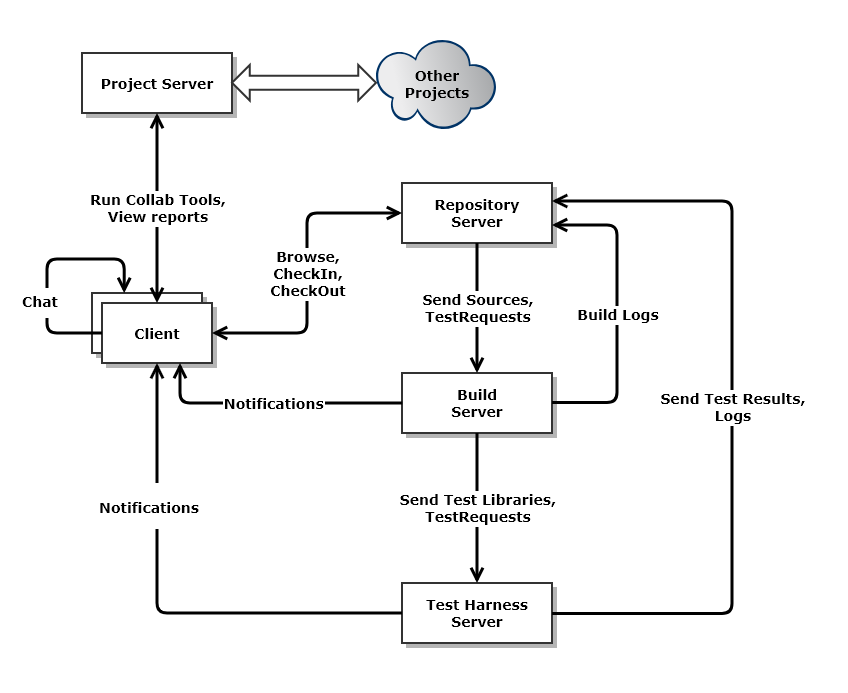
The process, described above, supports continuous integration. That is, when new code is created for a system, we build and test it in the context of other code which it calls, and which call it. As soon as all the tests pass, we check in the code and it becomes part of the current baseline. There are several services necessary to efficiently support continuous integration, as shown in the Figure 1., below, a Federation of servers, each providing a dedicated service for continuous integration.
-
Repository:
Holds all code and documents for the current baseline, along with their dependency relationships. It also holds test results and may cache build images. -
Build Server:
Based on build requests and code sent from the Repository, the Build Server builds test libraries for submission to the Test Harness. -
Test Harness:
Runs tests, concurrently for multiple users, based on test requests and libraries sent from the Build Server. Clients will checkin, to the Repository, code for testing, along with one or more test requests. The repository sends code and requests to the Build Server, where the code is built into libraries and the test requests and libraries are then sent to the Test Harness. The Test Harness executes tests, logs results, and submits results to the Repository. It also notifies the author of the tests of the results. -
Client:
The user's primary interface into the Federation, serves to submit code and test requests to the Repository. Later, it will be used view test results, stored in the repository. -
Collaboration Server:
The Collab Server provides services for: remote meetings, shared digital whiteboard, shared calendars. It also stores workplans, schedules, database of action items, etc.
Remote Build Server Prototypes:
In the four projects for this course, we will be developing the concept for, and creating, one of these federated servers, the Build Server - an automated tool that builds test libraries. Each test execution, in the Test Harness, runs a library consisting of test driver and a small set of tested packages, recording pass status, and perhaps logging execution details. Test requests and code are submitted by the Repository to the Build Server. The Build Server then builds libraries needed for each test request, and submits the request and libraries to the Test Harness, where they are executed.
The four projects each have a specific role leading to the final Remote Build Server:
- For Project #1 you will create an Operational Concept Document (OCD) for a Remote Build Server, and a small prototype demonstrating programmable builds.
- Project #2 focuses on building the core Build Server Functionality, and thoroughly testing to ensure that it functions as expected.
- In Project #3, you will build prototypes for Process Pools, Socket-based Message-passing Communication, and for a Graphical User Interface (GUI), packages all needed for the last project. These are relatively small "proof-of-concept" projects in which you experiment with design and implementation strategies.
- Finally, in Project #4 you will build a Remote Build Server, using parts you developed in earlier projects. You will also add design details to your OCD, from Project #1, to create an "as-built" design document.
So, for this project #3, we will develop the prototypes:
-
Message-passing Communication Channel:
All members of the Federation3 use Message-Passing Communication, implemented with Windows Communication Foundation (WCF). The Process Pool members will also communicate with the mother Builder using WCF4. -
Process Pool:
The build server may have very heavy work loads just before customer demos and releases. We want to make the throughput for building code as high as is reasonably possible. To do that the build server will use a "Process Pool". That is, a limited set of processes spawned at startup. The build server provides a queue of build requests, and each pooled process retrieves a request, processes it, sends the build log and, if successful, libraries to the test harness, then retrieves another request. Malformed code may cause one of the processes to crash, perhaps by a circular set of C++ #include statements which overflow the process stack. This however, won't stop the Builder, which simply creates a new process replacement, and reports the build error to the repository. Note that the process pools will need to communicate with the mother Builder process. That's one use for the first prototype. Each pooled process has the functionality of the Core Builder we constructed in Project #2l -
Graphical User Interface (GUI):
The Remote Builder will be accessed remotely from a GUI built using Windows Presentation Foundation (WPF). This prototype will be relatively simple5 step toward the final GUI used in Project #4.
Requirements:
Your Prototypes- Shall be prepared using C#, the .Net Frameowrk, and Visual Studio 2017.
- Shall include a Message-Passing Communication Service built with WCF. You are welcome to build on the Comm prototype demo.
- The Communication Service shall support accessing build requests by Pool Processes from the mother Builder process, sending and receiving build requests, and sending and receiving files.
- Shall provide a Process Pool component that creates a specified number of processes on command.
- Pool Processes shall use Communication prototype to access messages from the mother Builder process. You may simply have them write the message contents to their consoles, demonstrating that they continue to access messages from the shared mother's queue, until shut down.
- Shall include a Graphical User Interface, built using WPF.
- The GUI shall provide mechanisms to start the main Builder (mother process), specifying the number of child builders to be started, and shall provide the facility to ask the mother Builder to shut down its Pool Processes. It may do that by sending a single quit message.
- The GUI shall enable building test requests by selecting file names from the Mock Repository.
- Your submission shall integrate these three prototypes into a single functional Visual Studio Solution, with a Visual Studio project for each.
- In C# a package is a single file that has a prologue, consisting of comments that describe the package and its operations, one or more class implementations, and a test stub main function that serves as a construction test while building the package. This test stub is quite different from the test drivers we build with the Build Server and execute in the Test Harness. We will discuss these differences in detail in class.
- A software baseline consists of all the code that we currently consider being part of the developing project, e.g., code that will eventually be delivered as part of the project results. It does not include prototypes and code from other projects that we are examining for possible later inclusion in the current project.
- Our Federation, as implemented for Project #4, consists of A GUI Client, Build Server with Process Pool, a mock Repository, and mock Test Harness, all tied together with the Message-Passing Communication System.
- You will find the WCF demo here to provide a significant amount of help.
- You will find the WPF demo here will get you started quickly.
What you need to know:
In order to successfully meet these requirements you will need to know:- The definition of the term package and have looked carefully at a few examples.
- Definitions for Dynamic Link Libraries - see the class text, C# 6.0 in a Nutshell.